


See Deleted Messages
4.2840.00 Reviews
App Specs
- Version
- 1.6.5
- Updated On
- License
- Free
- Downloads
- 10,000,000+
- Developer
- ZipoApps
- Categories
- Communication
- Platform
- Android
Screenshots


 Analysis by AppCompare
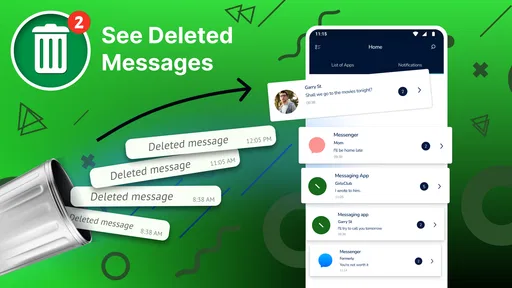
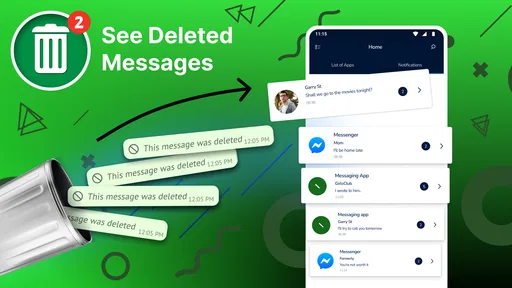
I find deleted-message tools easiest to judge by asking what they can realistically recover, and what they ask me to trade for that convenience. See Deleted Messages is an Android communication app from ZipoApps built around notification history: it can keep a copy of message content that reaches your device as a notification, so you may still be able to read it after the sender removes it from the chat. That makes it a useful backup for certain moments, not a way to reopen every erased conversation.
What the notification approach can and cannot do
The distinction matters because this app does not reach into a messaging service and restore its chat history. It depends on your phone receiving a readable notification and on the app being able to retain it. If you’re expecting a universal recovery tool that reconstructs messages from inside WhatsApp, Telegram, or another service, this is not the right mental model. It is closer to a notebook that copies what appeared on your lock screen or notification shade.
That also explains why results can vary from one conversation to another. A message that arrives while notifications are enabled and visible has a better chance of being recorded than one hidden by your settings, received while the phone is offline, or removed before the notification reaches you. I’d treat any saved item as a copy of what the notification showed, rather than proof that the full original message or attachment is available.
This is a meaningful difference from the usual alternatives. A chat app’s own history is the better place to find messages that remain in the conversation, while a device backup is intended for broader recovery and may involve restoring data rather than checking one unsent note. See Deleted Messages is more immediate and narrower: it focuses on what notifications expose. If you only want reliable access to messages that were never deleted, the original chat app is simpler and avoids giving another app notification access.
Reading and navigating without extra effort
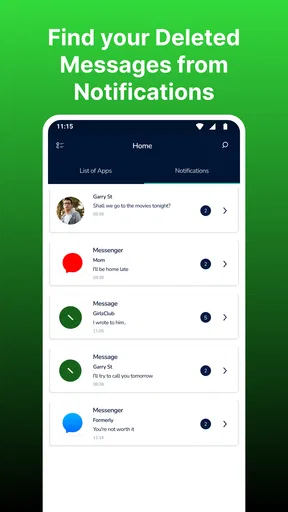
In my experience, the appeal of a tool like this is that it should make a small task straightforward: open it, find the relevant notification, and read what was saved. A clean layout is helpful when you’re checking a quick message rather than managing a new inbox. Still, ease of navigation does not remove the need to understand the source of the content. If an item is absent, that may reflect how the original app sent notifications, not a mistake you can fix by searching harder inside this one.
For readability, I’d start by checking how your phone already presents incoming message previews. If the notification itself only displays a sender name or a short fragment, a notification-based record may have the same limitation. A practical tip is to test the setup with a willing friend and an ordinary, non-sensitive message before relying on it for anything important. That gives you a clearer sense of what actually appears on your device, without turning a missed message into a mystery.
Everyday use, with sensible expectations
Imagine you’re cooking, your phone lights up with a message, and you plan to answer after you finish. When you come back, the sender has removed it. If the notification reached your phone and included the text, this app may let you check what you missed without asking the sender to repeat it. That is a modest but plausible convenience for busy group chats, where messages can be corrected or withdrawn before you’ve had a chance to read them.
Worth Reading Before You Choose

EA SPORTS FC Mobile 26 Is a Bigger Football Game, but It Takes Time

Flipboard Shows What News Apps Must Do Beyond the Feed

Switching to Android Auto Means Rethinking Your Driving Routine

Google Calendar Makes a Crowded Week Easier to Manage

Ludo King Makes the Most of the Minutes Between Plans

Baby Panda World Brings Quick Play to Modern Phones, but Its Game Library Feels Busy
I see the strongest fit for people who routinely miss notifications and are comfortable keeping a record of message previews. It can also be useful when you need to remember a brief detail someone sent and then unsent. It is a weaker choice for anyone who keeps notifications off, hides message previews for privacy, or wants a dependable archive of every conversation. In those situations, changing your notification habits may create a privacy trade-off you don’t want, and asking the sender to resend the message is often the better option.
Access needs and the privacy trade-off
Notification-based access can help in a specific situation: you may be away from a chat app, have missed a brief alert, or find it easier to review a saved notification than to return to a busy conversation. But it is not a substitute for the accessibility options in your phone or messaging app. Larger text, screen-reader behavior, contrast, and other display preferences depend on the device and app environment; I would check the interface on your own phone before making it part of an essential workflow.
The main friction is not complicated navigation so much as the access this kind of tool needs. Notification access can expose personal message previews, including content from conversations you would rather keep private. I’d be cautious on a shared or unlocked device, and I would avoid using saved notifications as a record of sensitive discussions. If you rely on a phone’s notification controls to keep private content off the screen, enabling broader visibility just to catch unsent messages may be the wrong exchange.
There are practical edge cases, too. A muted chat, a notification setting that hides content, or a message that arrives when your phone cannot show it can leave nothing useful to save. Media is less predictable than a short text preview: seeing an alert about a photo does not guarantee that the image itself will be retained in a viewable form. I would not use the app as the only copy of an important file or as evidence that a sender’s full message was captured.
Who should try it, and who should skip it
The app is free to download, and its Everyone age rating makes it broadly available, though that does not mean every household will want message previews stored on a device. It has a 4.2 average from around 140,000 ratings and over 10 million installs, so it has reached a large audience. The current version is 1.6.5, and it runs on Android 5.0 or later. Optional in-app purchases range from $0.99 to $99.99 per item, so I’d check the purchase details in the app before choosing anything paid; the basic download itself costs nothing.
At a glance, the app is suited to Android users who want a convenient second look at notifications and understand that capture is conditional. I’d skip it if you need guaranteed recovery, do not want another app handling notification content, or use a device where privacy settings deliberately conceal previews. It is also a poor fit if your real goal is to monitor another person’s conversations: notification access is a personal convenience, not a sound basis for expecting complete or dependable access to someone else’s messages.
Before enabling it, I’d ask myself three practical questions: Do I usually allow message previews? Am I comfortable with this app seeing them? And would I still be happy with it if it missed a message because the notification never appeared? If the answer to any of these is no, the safer choice may be to leave your settings as they are and rely on the original sender or chat app instead.
Getting Started with See Deleted Messages
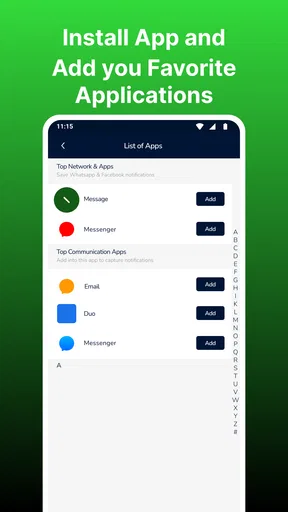
First things first, you’ll need to download the app on your Android device. A quick search on the Play Store, and you’ll be ready to roll. The installation is smooth and straightforward, so no tech wizardry required here. Once it's up and running, the app dives right into your notifications, keeping an eagle eye on any incoming messages.
Setting it up is a breeze. You just need to grant a couple of permissions, which might feel a bit invasive, but it’s essential for the app to perform its magic. So, if you’re cool with that, you’re all set to start unearthing those deleted gems.
How It Works
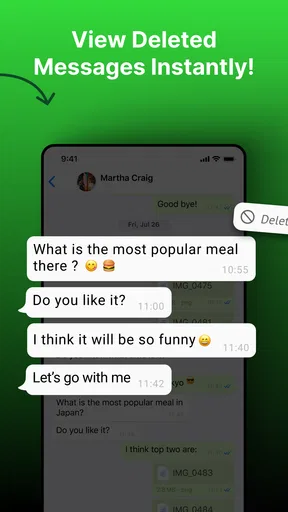
Here’s the scoop: See Deleted Messages works by creating a backup of your notifications. Whenever someone deletes a message, the app retains the original notification, allowing you to access it later. It’s like having a little detective in your pocket, keeping tabs on all the disappearing acts in your chat history.
One thing I found really neat is the user-friendly interface. You're greeted with a clean layout that’s easy to navigate. Plus, the app supports a wide range of messaging platforms like WhatsApp, Telegram, and Facebook Messenger, so you’re covered across the board.
Why It’s a Game-Changer
Picture this: You see a notification pop up, but before you can read it, it’s gone. Annoying, right? With See Deleted Messages, you can revisit those moments and satisfy your curiosity. It’s also handy for those "oops" moments when your friend deletes a message they regret sending. Now, you’re in on the secret!
Another cool aspect is that it doesn’t just stop at text. The app can retrieve media files too, so those disappearing photos and videos won’t slip through your fingers anymore. It’s like having an archive of moments that were almost lost.
Things to Keep in Mind
Now, while this app is super handy, there are a few things you should be aware of. Since it relies on notifications, if a message is deleted before your device receives the notification, it won’t be captured. So, timing is key here.
Also, while the app itself is lightweight, having it constantly run in the background might have a slight impact on your battery life. Nothing too drastic, but it’s something to consider if you’re trying to eke out every last minute of juice from your device.
Lastly, privacy is a big deal, right? The app requires access to your notifications, which might feel like you’re giving away a piece of your digital soul. Just make sure you’re comfortable with the permissions before diving in.
Final Thoughts
In a world where messages can disappear in the blink of an eye, See Deleted Messages gives you a handy way to keep track of what’s going on. Whether you’re trying to catch up on a deleted group chat or simply curious about what was unsent, this app has you covered.
It’s a fun and useful tool to have, especially if you love being in the loop. Just remember to keep an eye on those permissions and enjoy the peace of mind that comes with not missing a beat in your conversations. So, go ahead, give it a whirl, and see what hidden messages you can uncover!
Pros
- Recovers deleted messages quickly.
- Supports multiple messaging apps.
- User-friendly interface design.
- No root access required.
- Lightweight and fast performance.
Cons
- Limited to text message recovery.
- Ads can be intrusive at times.
- No recovery for media files.
- Requires constant notifications access.
- May not support all app versions.
FAQs for See Deleted Messages
What is See Deleted Messages and how does it work?
See Deleted Messages is an app designed to help users recover and view messages that have been deleted by the sender on messaging platforms. It works by accessing notifications and creating a backup of messages before they are deleted, allowing users to read them later without any hassle.
Is See Deleted Messages safe to use on my device?
Yes, See Deleted Messages is generally safe to use. It only accesses notifications to store messages and does not require intrusive permissions. However, always download from reputable sources like Google Play Store or Apple App Store to avoid malicious versions. Regular updates ensure better security and functionality.
Does See Deleted Messages work with all messaging apps?
While See Deleted Messages is compatible with most popular messaging apps like WhatsApp and Telegram, it may not work with every platform due to varying notification settings and app restrictions. Check the app’s compatibility list before installation to ensure it supports your preferred messaging app.
Will using See Deleted Messages affect my phone’s performance?
Generally, See Deleted Messages runs in the background and minimally affects your phone's performance. However, like any app, excessive use or having many apps running simultaneously can slow down your device. It is advisable to monitor your phone's performance and manage apps accordingly.
Are there any privacy concerns with See Deleted Messages?
Privacy is a common concern with apps like See Deleted Messages. The app requires access to your notifications to function, which may raise privacy issues for some users. It is important to review the app’s privacy policy and settings to ensure your data is handled appropriately and to adjust permissions as needed.


